
UTM Tracking Parameter Guidelines
Intro
UTM (Universal Tracking Module) tracking parameters – sometimes called tracking codes – are standard URL parameters that marketers add to links to track the effectiveness of marketing initiatives. These were originally introduced in the analytics platform Urchin, which Google later acquired and became Google Analytics. However, because of the widespread use of UTM’s in digital marketing, many marketing tools, and platforms — for example, Adobe Analytics, Crazyegg, Marchex, etc. — understand and make use of these tracking codes.
For this reason, it is important that we employ UTM parameters in our digital marketing initiatives, and that we strive to maintain a clean and consistent schema of values so that our marketing data is consistent and clean.
What are UTM tracking codes?
It is very useful for digital marketers to become familiar with the anatomy of a URL and how query parameters work. Query parameters are added to the end of a URL as optional key/value pairs which pass data to the web page. The question mark “?” signals the beginning of a query string which is an ampersand-delimited list “&” of keys set to “=” values:
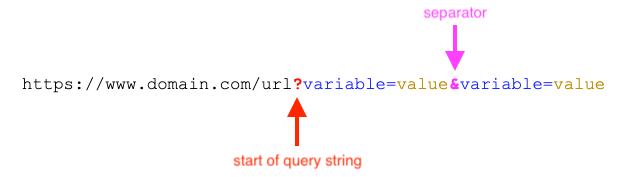
Note that the order of the parameters is not important. There are five UTM parameters, but typically only three are required*:
- utm_source*
- utm_medium*
- utm_campaign*
- utm_term
- utm_content
TIC UTM Naming Conventions
Our main usage for UTM tracking codes is in Google Analytics. GA will sort and categorize traffic when it detects UTMs in a URL. Note that in general, we do NOT use the auto-tagging feature in order to maximize control over channel classifications. For this reason, it is especially important for teams to tag their campaign traffic with correct UTMs. By far, the most important UTM parameter value to set correctly is utm_medium as that is the main parameter used for categorizing our traffic into marketing channels.
UTM_Medium
GA will use this parameter using waterfall logic to match the value against the values below. If it does not find a match, the traffic for that campaign will go into the “Other” channel as a default. It is important for us to regularly go into the Other channel in analytics and clean up any campaigns that have typos or mismatched values if they should not be categorized as Other.
Accepted Values
| Channel | UTM_medium Value | Notes |
|---|---|---|
| utm_medium=email | ||
| Paid Search | utm_medium=cpc | |
| Display | utm_medium=display | |
| Paid Social | utm_medium=paid-social | |
| utm_medium=print | ||
| ILS | utm_medium=ils | Specific to ICAC |
| Listing Sites | utm_medium=listing-sites | Specific to ICDC |
| Organic | utm_medium=locallisting | Organic search traffic does not need to be tagged, but managed local SEO, such as Google Business listings, is considered organic for our purposes |
| Organic Social | Organic or earned social does not need UTMs to be tracked | |
| Referral | All traffic coming from a click (not typed) that does not contain UTMs will be tracked as Referral | |
| Direct | All traffic that does not have UTMs and did not come from a click (typed in) will be tracked as Direct | |
| Other | Any other value than listed above | Traffic that does have UTMs and does not match the values above will be categorized as Other - for example, “video” |
UTM_Source
The utm_source parameter tells us where the traffic is coming. This could be the website or platform the link is published on, or the system where the audience originated from. For example: google, facebook, wsj.com, the Data Extension or query name in the email platform, the platform that created the list or look-alike audience.
Example: utm_source=google
*We do not enforce any values for Source, but it is important for marketing teams to align on a naming convention so that data is not fragmented. For example, if part of the team is using “zillow.com” and another group is using “zillow” our data will become muddy.
UTM_Campaign
The utm_campaign tells us the specific campaign or promotion. Some of our divisions have defined values for campaign names which are intended to be used in automated reporting to categorize campaing traffic by region, tactic, audience, or specific property or building (ICAC and ICO have strict campaign naming schemas for this). In other cases, we do not enforce campaign name values, but should be named something descriptive and unique that will have meaning to the marketing team.
Because these values will be used in a URL, it is a good idea to use URL safe characters. In general, we use hyphens instead of spaces, all lower case, and no special characters (!%#^*@).
Example: utm_campaign=brand-geotargeted-restaurants-fall-2022
ICAC Campaign Naming Convention
The campaign name structure for ICAC UTM values follows this format:
[Campaign Code]_[Region]_[Submarket]_[Community]_[Audience]_[Targeting]_[Tactic]_[Vendor]_[Name]
The UTM strings can be easily created by Marketing users with the Google Forms tool that was set up, all the output UTM string values go into this spreadsheet. Note that all the available values for the fields below can be found in these two documents in Google Drive.
Campaign Code
This is an optional code or number. Some agencies use internal codes and numbers for specific campaigns and those would be placed here.
Region
This is the Market (Orange County, San Diego, LA, or Norcal).
Sub Market
This the specific area within the greater market.
Community
This is the name of the community.
Audience
This is the intended audience for the campaign. For example, prospects, current residents, leads, unclosed tours, etc.
Targeting
This describes how the audience is created or reached. Some examples are 1st party data from CRM, remarketing pools, search keyword intent (brand or non-brand), etc.
Tactic
This describes what the campaign is trying to do. For example, create awareness (upper funnel), generate leads (lower funnel), support a lease-up, support renewals, etc.
Vendor
This lets us know which vendor/agency, or internal team is responsible for the campaign.
Name
This is the specific name of the campaign or promotion. For example, Evergreen Brand Search, or Summer Move in Special.
Example
Here is an example campaign name “-norcal-sy-rwp-all-dt-aw-in-”
This campaign name tells us the campaign is for the Redwood Place (rwp) community in the Sunnyvale (sy) submarket of Norcal. It is targeting all audiences derived from a direct source (dt), such as a platform or publisher. The goal of the campaign is to create upper funnel awareness (aw) and was created by our internal marketing team (in). The campaign does not have an internal code or name.
UTM_Content
This optional parameter is useful if you are running an A/B test, such as having to variations on creative, you can track which version of the campaign was clicked by the user.
UTM_Term
This optional parameter is designed specifically for paid search campaigns to pass through the specific keyword the user typed in.
Note that the optional UTM parameters can be used for other creative uses to store other values that might be insightful for the marketing team.
Best Practices
Do: Try to always include UTMs in links (or redirects!) that send traffic to our websites from an external source, if possible.
Don’t: Include UTMs on any internal links on our websites (as a general rule), as this will obscure the original source of the traffic.
Do: Use all lowercase letters and replace spaces with hyphens (note that most of our GA implementations will force the values to lowercase anyway for consistency).
Example: fall-affinity-newsfeed-audience-promotion