
How do I add a Quick-Move-In home to IP.com?
Steps
- Navigate to Salesforce: https://land.lightning.force.com (Users will need to have access to Marketing Profile).
- In the Search bar, type in the address of the QMI home and select. (eg. 134 Roscamore)
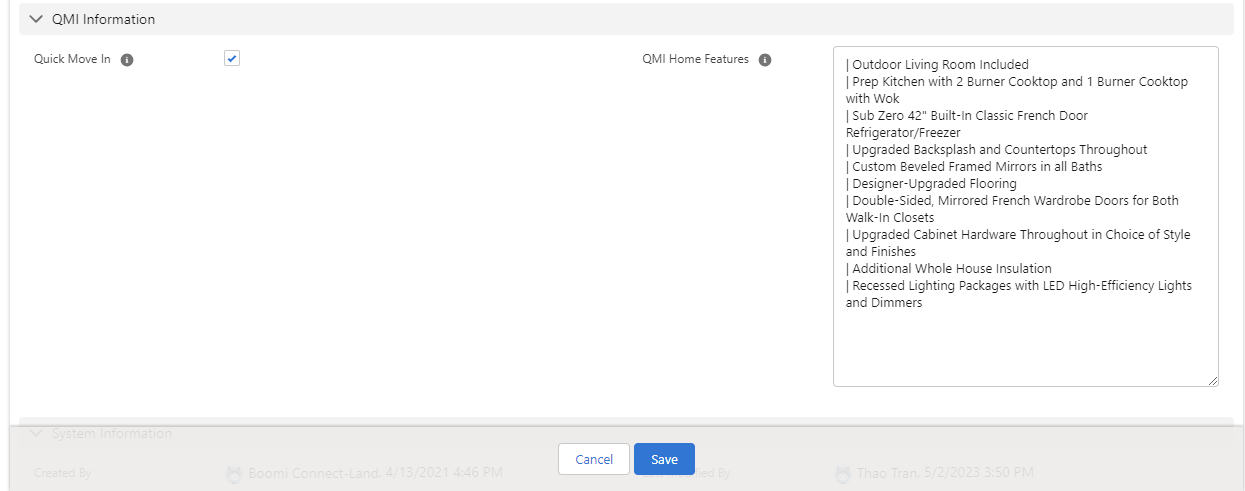
- Scroll to the bottom to section: QMI Information.
- Select the Quick-Move-In checkbox and hit SAVE.
- For QMI Features, add all unique features (use | if you want to add a bullet) and hit SAVE.
Notes
- The QMI feed is uploaded to the website every 3 hours starting at 12:00am.
- When the lot status changes to ‘Reserved’ the QMI home will automatically be deleted from IP.com
- Any updates in Saleforce will automatically update on IP.com after the feed is run.
- If you’re unable to edit QMI features, read this.